Playwright vs Cypress (Quick Rundown)
I needed to choose something for a project. Dynamic, third-party stuff, and a team split between "quick" devs and "strict" QA. I wanted to know why they're different, who they're for, and what happens if I pick wrong.
To be clear: I'm not endorsing one over the other. This breakdown is simply about sharing what I’ve learned while exploring the trade-offs between Playwright and Cypress. Your choice should ultimately depend on your own or your team’s specific workflow, requirements, and how much you value simplicity versus flexibility.
Quick history
We had Selenium for years. Then SPAs showed up. React, Vue, Angular. The DOM started changing constantly. Selenium couldn't handle it traditionally.
Cypress appeared Cypress run tests inside the browser. No HTTP back and forth. Just JavaScript next to your app. Frontend devs used & liked it. Fast, visual, you could see everything happening.
Playwright followed after Microsoft hired the Puppeteer team and said "make this work for all browsers." That's Playwright. Different approach, it hooks into browser protocols directly instead of running inside. Faster than Selenium, more stable than Puppeteer, no weird limitations Cypress has (holy glaze).
Now we've got a fight.
The architecture
This is very technical and definitely important. The architecture decides what you can test, what you can't, and how frustrated you'll get.
Cypress
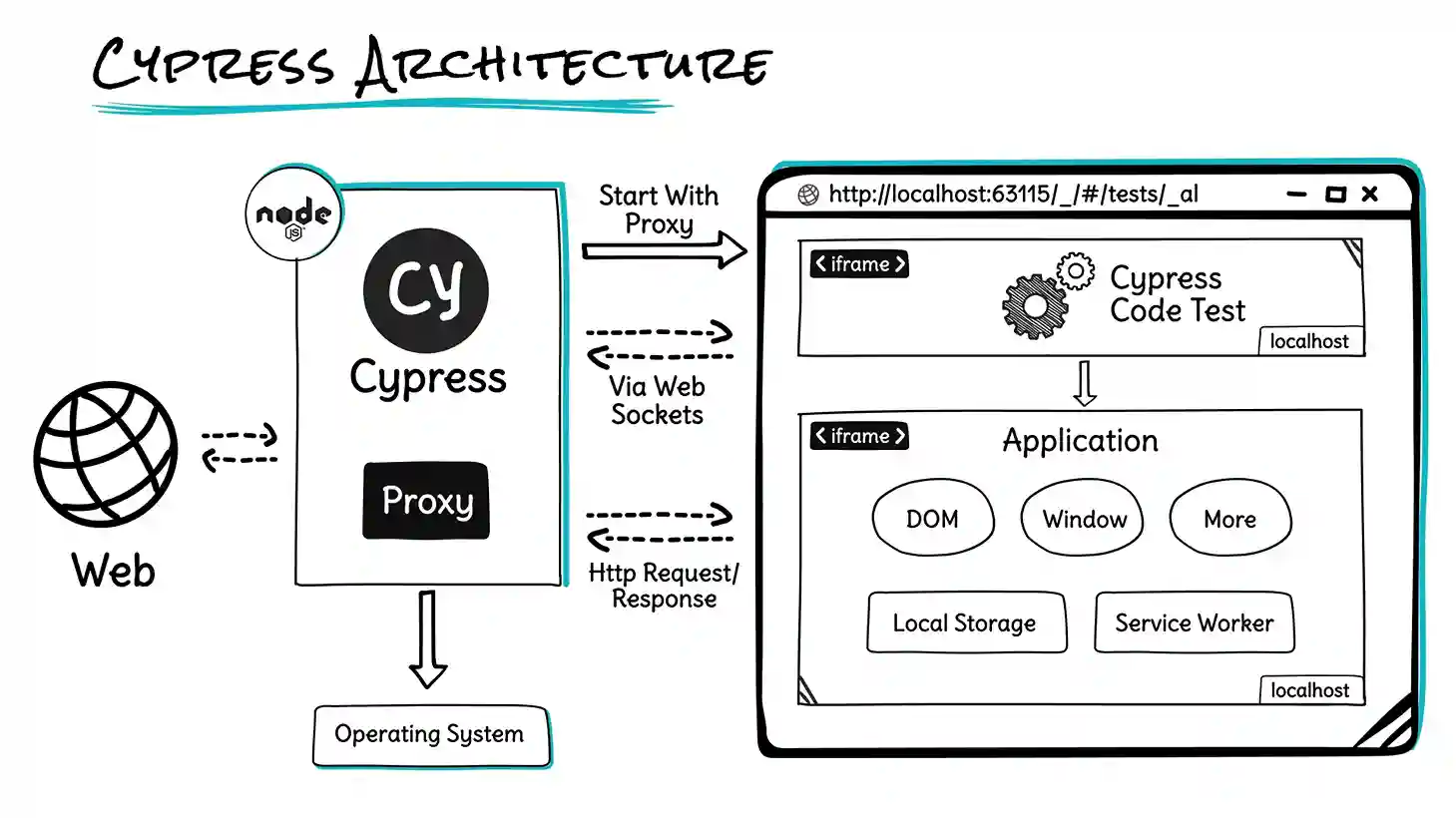
Cypress Architecture by Sathwik Prabhu
As shown in the architecture, Cypress is unique because it puts your test code and your application in the same browser loop. It sets up a Node.js Proxy that intercepts all traffic. This allows Cypress to open the browser and render two specific iframes:
- Your Spec File: The code you wrote.
- Your Application: The site you are testing.
Because the Proxy strips away security barriers, these two iframes can talk to each other directly. Your test code can reach into the application iframe and manipulate the DOM natively.
You are bound by the laws of the browser cause you live inside that single browser window. Since it runs in the browser, your tests must be JavaScript/TypeScript and your test code competes for the same resources (CPU/Memory) as your application.
Playwright
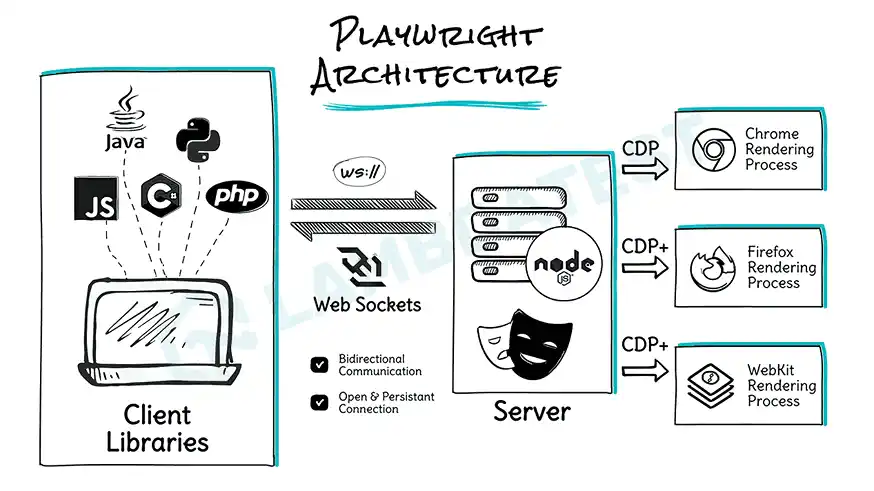
Playwright Architecture by Sathwik Prabhu
Playwright uses a Client-Server architecture.
- Client: Your test script (Node, Python, Java, etc.) sends commands.
- Transport: These commands are sent via WebSockets (a persistent, bidirectional connection) to the Playwright Server.
- Server: The server translates these commands into CDP (Chrome DevTools Protocol) to drive the browser engine directly.
You are basically controlling the car remotely with a direct line. Because the Client talks to the Server via standard WebSockets, you can write tests in Java, Python, or C#. The WebSocket connection stays open (handshaking happens once), making execution extremely fast. If the browser crashes, your test script doesn't necessarily crash with it.
You are "outside" the page. You can't just console.log(window.appData) without injecting code (using page.evaluate()). It adds a tiny layer of friction for deep white-box testing.
What they actually do
Browsers
Matters if you have iPhone users.
- Playwright: Chrome, Firefox, and WebKit (Safari's engine). Real WebKit build included. Works in Playwright's WebKit = works on Safari. Solid.
- Cypress: Chrome, Firefox, Edge. "Experimental" WebKit that uses Playwright's build.
Multiple tabs
- Cypress: The Puppeteer plugin allows you to do this.
- Playwright:
const newPage = await context.newPage(). Done.
Iframes
Iframes suck but we use them everywhere; forms, videos, widgets.
- Cypress: Needed plugins or complex custom commands. Better now, but still clunky in my opinion.
- Playwright:
page.frameLocator(). That's it. Treat it like any page element.
Network mocking
- Cypress:
cy.intercept(). This is Cypress's strength. Spy on requests, stub responses, delay for loading states, force errors. Really detailed and intuitive. - Playwright:
page.route(). Does the same thing.
Mobile testing
- Cypress: Mobile viewports work fine. Set screen to iPhone X size, but it's still a desktop browser.
- Playwright: Viewports plus device emulation. Geolocation, permissions, locale, touch events. Closer to real mobile web.
Languages
- Cypress: JavaScript or TypeScript.
- Playwright: JavaScript, TypeScript, Python, Java, C# (.NET). Huge for teams with QA who prefer other languages.
Flakiness
Nothing worse than a test that passes, then fails, then passes again.
Cypress: retry-ability
cy.get('.button') doesn't look once. Keeps looking for 4 seconds until it appears. Assumes DOM will settle.
But commands queue up and run one by one. Do cy.get('.list').find('.item') and if the list re-renders mid-search, you get "detached DOM element" errors. Cypress tries, but React rendering can outsmart it.
Playwright: auto-wait
Before clicking, Playwright checks:
- Element in DOM?
- Visible?
- Stable (not animating)?
- Getting events (not behind modal)?
- Enabled?
Asks the browser "can I click this?" Stable. "Strict Mode" forces you to be even more specific- if your selector hits two buttons, instant fail. Cypress would click the first one (maybe wrong one, flake later). Playwright makes you write better selectors. From what I've seen, Playwright's less flaky at scale. Cypress is easier to write, but Playwright's harder to break.
Using them
Cypress
Cypress's test runner is beautiful.
- See the app and commands side by side
- Hover over a command, window shows that exact moment
- Browser console access
Playwright
Playwright's catching up:
- UI Mode mimics Cypress. Timeline, DOM snapshots, network tabs. Really good.
- VS Code extension. Run tests in VS Code, set breakpoints, step through while browser highlights elements.
- Trace Viewer for CI, see full interactive recording; DOM snapshots, network, console, timeline.
Speed & Cost
Playwright is faster. It runs tests parallel by default using worker processes. Cypress runs one at a time. Want Cypress parallel? Need their Cloud service or complex manual setup.
| Cost | Playwright | Cypress |
|---|---|---|
| Price | Free (Open Source) | Free (Open Source, Full Potential in Cypress Cloud) |
| Scaling | Free parallelization | Paid Cloud for parallelization/analytics or with Sorry-Cypress |
Who are they for? (my opinion)
Building features. Living in Chrome DevTools. You just want cy.click() to work.
2,000 regression tests due in 10 mins. Need WebKit, multi-tabs, and backend integration.
Quick comparison
| Thing | Cypress | Playwright |
|---|---|---|
| Focus | Developer experience | Performance |
| How it works | In-browser (Node proxy) | Out-of-browser (WebSocket) |
| Languages | JS/TS only | JS, TS, Python, Java, .NET |
| Browsers | Chromium, Firefox, Safari (Experimental) | Chromium, Firefox, Safari |
| Speed | Slower (queue) | Fast (parallel by default) |
| Multiple tabs | Yes | Yes |
| Flaky tests | Retry | Auto-wait |
| Debugging | Test Runner (local) | Trace Viewer (CI + local) |
My take
Cypress came from "Shift Left" - testing during development, not after by a separate team. It's awesome as a developer tool. Playwright is built for Docker containers on cloud servers. Built to run thousands of test variations across 3 browser engines. It's an infrastructure tool.
Get Cypress if you're frontend devs building a standard SPA and need tests fast. Easier to learn, more fun to use. Get Playwright if you're building real testing infrastructure, have dedicated QA, or have complex needs. More powerful, faster, cheaper at scale.
But whatever you pick, any test is better than no test.
That's it. If you disagree, cool. Always happy to hear other takes.
Happy testing!