How to Fake or Mock Camera Input for Browser E2E Testing
Thumbnail is AI Generated
I've been working as an SDET intern, and I got stuck on this interesting issue. I needed to automate tests for a KYC flow, where the app asks for camera permission, you show your face or ID, and the backend checks if you're legit.
But like... CI/CD pipelines don't exactly come with webcams attached lmao.
I spent time googling this. There's scattered info everywhere, but nothing that specifically showed how to do it in Katalon (but it's pretty similar anyway) so I decided to share it here.
Important stuff you need to know first
This approach is Chromium-only. If you're testing on Safari or Firefox, you're gonna have a rough time.
Before you try any of this, here are the constraints:
-
Chromium browsers only: Works perfectly on most Chromium-based browsers. Safari doesn't support this, and Firefox is annoying because you can't easily inject a video file into the media stream. Just stick to Chromium.
-
File format must be specific: You can't just use an
.mp4. Chromium wants.y4m(YUV4MPEG) or.mjpegfiles. These format is very large in size, so keep your test videos short. You'll needffmpegor an online converter to turn your normal videos into.y4m. -
No hot-swapping videos: Since we're passing arguments to the browser process itself, if you wanna test different scenarios (like "blurred face" vs "no face detected"), you gotta close the browser and relaunch it with a different video path. Kinda annoying but it is what it is.
The actual solution
The logic is honestly pretty simple. We're basically telling the browser to fake it. You need three specific Chromium arguments:
--auto-accept-camera-and-microphone-capture
Bypasses that permission popup. I use this instead of --use-fake-ui-for-media-stream because the fake UI adds this weird overlay that screws up visual regression tests. Plus auto-accept feels closer to how a real user behaves after they've already clicked "Allow."
--use-fake-device-for-media-stream
As its name suggest, fake device. This forces the browser to use virtual, synthetic video/audio feeds instead of real hardware.
--use-file-for-fake-video-capture=/path/to/video.y4m
This is the thing that points to your actual video file so that it gets fed into the fake device.
How to actually implement this
Katalon Studio
For Katalon, I didn't wanna put these in the global Project Settings because I need different videos for different test cases. So I initialize the driver manually in each script.
This example assumes you put your .y4m files in Include/resources/ in your project folder.
import org.openqa.selenium.WebDriver
import org.openqa.selenium.chrome.ChromeDriver
import org.openqa.selenium.chrome.ChromeOptions
import org.openqa.selenium.remote.DesiredCapabilities
import com.kms.katalon.core.webui.driver.DriverFactory
import com.kms.katalon.core.configuration.RunConfiguration
import com.kms.katalon.core.webui.keyword.WebUiBuiltInKeywords as WebUI

String VIDEO_NAME = "my_test_face_video"

// Video should be at: YourProject/Include/resources/my_test_face_video.y4m
String VIDEO_FILE_PATH = RunConfiguration.getProjectDir() + '/Include/resources/' + VIDEO_NAME + '.y4m'

ChromeOptions options = new ChromeOptions()

options.addArguments('--auto-accept-camera-and-microphone-capture')
options.addArguments('--use-fake-device-for-media-stream')
options.addArguments('--use-file-for-fake-video-capture=' + VIDEO_FILE_PATH)

DesiredCapabilities cap = DesiredCapabilities.chrome()
cap.setCapability(ChromeOptions.CAPABILITY, options)

System.setProperty('webdriver.chrome.driver', DriverFactory.getChromeDriverPath())
WebDriver driver = new ChromeDriver(cap)

// tell Katalon to use this new driver instance
DriverFactory.changeWebDriver(driver)

// your actual test goes here or you can reuse this later
You can totally make this modular! Wrap it in a Custom Keyword and pass VIDEO_NAME as a parameter. Makes it way easier to run different scenarios.
Playwright
If you're on the JS/TS stack, the logic is the same and you can put the arguments in your launch config.
const { chromium } = require('playwright');

(async () => {
  const browser = await chromium.launch({
    args: [
      '--auto-accept-camera-and-microphone-capture',
      '--use-fake-device-for-media-stream',
      '--use-file-for-fake-video-capture=./videos/my-face.y4m'
    ]
  });

})();
Cypress
For Cypress, you can hook into the before:browser:launch event in your config file.
const { defineConfig } = require("cypress");

module.exports = defineConfig({
  e2e: {
    setupNodeEvents(on, config) {
      on('before:browser:launch', (browser, launchOptions) => {
        if (browser.family === 'chromium' && browser.name !== 'electron') {
          launchOptions.args.push('--auto-accept-camera-and-microphone-capture');
          launchOptions.args.push('--use-fake-device-for-media-stream');
          launchOptions.args.push('--use-file-for-fake-video-capture=cypress/fixtures/my-face.y4m');
        }
        return launchOptions;
      });
    },
  },
});
Tbh this saved me so much time
Once I figured out the right arguments and the whole .y4m thing, tests became way more stable. No more manual testing for every single change to webcam-related flows.
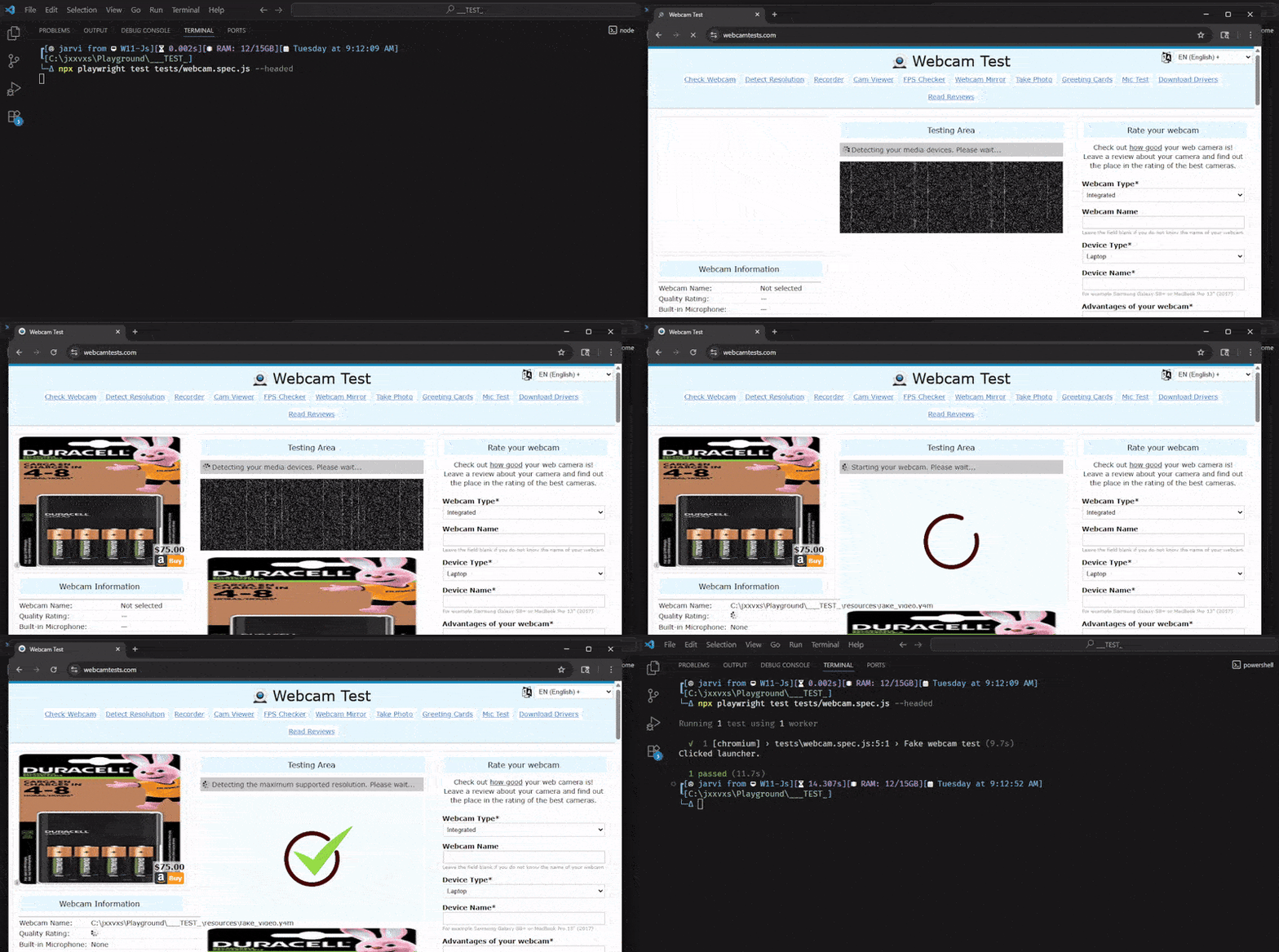
Here is the test running in action with the fake video feed
Just remember:
- Chromium-based browsers only
- Convert your videos to
.y4mformat - Restart the browser if you need to swap videos mid-test suite
Hope this saves you the headache I went through. If you found a better way to do this, lmk! I'm always down to learn something new.
Happy testing!